
Guide · NinjaTrader 8
NinjaTrader risk controls: a daily loss limit on your chart
NinjaTrader 8's Chart Trader and ATM templates protect each trade with a stop and a target, but a stop only limits one trade. Account-wide limits, such as a daily loss limit or a trailing drawdown, usually come from your broker or prop firm. NT Chart Trader Pro (NTP) adds your own limits on the chart: a daily loss and profit guard that locks you out for the day, an equity floor, a cap on entries, and news and trading-hours blocks. Here is what each one does, including exactly what happens when a limit is hit.
With NinjaTrader alone
What NinjaTrader and your provider give you
Inside NinjaTrader, risk is mostly per trade. You choose a quantity, and an ATM template attaches a stop loss and a profit target, with optional auto break-even and auto trail. Nothing in Chart Trader itself counts how much you have lost today or stops you from clicking Buy again.
Account-level limits are a separate layer. Brokers, clearing firms and prop firms set rules such as daily loss and trailing drawdown, and what you can see or change depends on your account and connection. Use them where you have them. NTP does not replace them; it adds limits you set yourself, inside the panel you trade from, so you can set them tighter than your provider's and stop yourself before their rule is ever reached.
Daily guard
A daily loss limit indicator for NinjaTrader 8
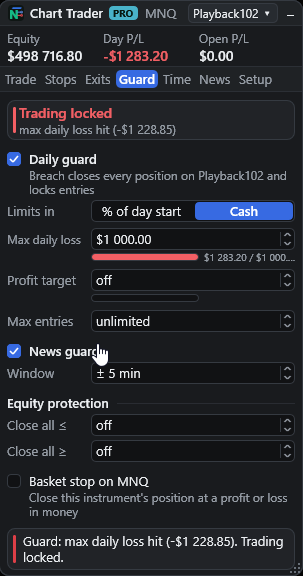
The Guard tab's daily guard is on by default. Set a maximum daily loss and, if you want one, a daily profit target, either as a percentage of the day's starting equity or as a cash amount. Day P/L is the account's realized P/L plus open P/L, and progress bars show how close you are to each limit.
- Max entries per day: cap how many trades you open (0 = unlimited). An entry split into several orders counts once.
- Equity protection: close everything when account equity falls to a floor or rises to a ceiling.
- Basket stop: close this instrument's position at a cash profit or loss. It applies to the panel's instrument only, not a basket of several instruments.
The guard tab turns red while the account is locked, and every entry is checked first: real-time data, account connected, valid bid and ask, not locked, spread limit, trading hours, max entries and news.
Read this first
What a breach does to your account
When the daily loss or profit target is reached, or equity touches the floor or ceiling, NTP treats it as a breach and acts on the whole account, not just one chart:
- It flattens every position on the account, on every instrument.
- It cancels all working orders on the account, including orders NTP did not place, such as ones from Chart Trader, the DOM or another tool.
- It clears its own hidden and armed orders, plays an alert sound and shows a NinjaTrader alert.
- It locks new entries until the next local calendar day. The guard cannot be switched off while locked, and the lock is shared by every NTP panel on that account.
Closing is a request to your broker: market exits can fill away from the trigger price, so check the account after a breach. The lock resets on your computer's calendar date, not on the exchange session.
Time and news
Trade only when you mean to
- Trading hours: block new entries outside a local time window (default 08:30 to 16:00; overnight windows work too).
- Flatten daily: close positions at a set local time (default 15:55).
- Time stop: close a managed position after a set number of minutes.
- News guard: block entries for a set number of minutes (default 5) either side of high-impact events for the instrument's currencies. It also blocks when the calendar is stale or failed to load, so a missing feed does not quietly turn it off.
The economic calendar comes from a third-party weekly feed, so its timing and coverage are not guaranteed. The News tab shows a countdown to the next event and turns gold under 30 minutes.
Prop firm risk management
Your own limits under your firm's.
Prop firm rules such as daily loss and trailing drawdown end an account when they are broken. NTP helps you stay further inside them:
- Prop preset: one click sets 0.5% risk per trade, the daily guard on with a 2% daily loss, 5 entries a day, the news guard and flatten at a set time. Presets load while you are flat.
- % DD sizing: risk a percentage of the trailing drawdown you have left, read from Tradovate, from NinjaTrader when the broker reports it, or from a Max DD you enter. See the position size calculator guide.
- Per account: each account keeps its own guard, lock and drawdown peaks.
NTP does not know any firm's rules and does not make an account compliant. Read your firm's rules and set your limits inside them.

Side by side
NinjaTrader alone vs NTP
| Control | Chart Trader + ATM | NT Chart Trader Pro |
|---|---|---|
| Per-trade stop | From the ATM template | Ticks, points, bars or ATR, sized to your risk |
| Daily loss and target | Depends on your broker or firm | % of day-start equity or cash, with a lock until the next day |
| Equity floor or ceiling | Depends on your broker or firm | Close everything at a set equity |
| Max trades a day | Your own discipline | Entry cap, splits count once |
| News and hours | Your own discipline | Entries blocked around high-impact news and outside your hours |
| Trailing drawdown | Tracked yourself | % DD sizing from the drawdown left |
NTP's limits run inside NinjaTrader on your computer. Server-side limits from your broker or firm are separate.
Limits
What NTP's risk controls cannot do
- They run locally: NinjaTrader must be running and connected with the chart open.
- A breach cancels every working order on the account, including ones NTP did not place.
- The lock follows your computer's date, not the exchange session.
- Stop and exit fills cannot be guaranteed, so a loss can go past the limit you set.
- They do not replace your broker's or prop firm's rules.
Does NinjaTrader 8 have a daily loss limit?
Account-wide limits such as a daily loss limit or trailing drawdown are normally set by your broker or prop firm, and what is available depends on your account and connection, so check with your provider. Chart Trader and ATM templates protect each trade with a stop and target; they do not stop you opening the next trade. NTP adds a daily loss limit on the chart that locks new entries for the rest of the day.
What happens when the daily guard is hit?
NTP flattens every position on the account, on every instrument, cancels all working orders on the account, including orders NTP did not place, clears its hidden and armed orders, plays an alert and locks new entries until the next local calendar day. The guard cannot be switched off while it is locked.
When does the lock reset?
At the next local calendar date on your computer, not at the exchange session open. Bear this in mind if your trading day crosses midnight.
Does NTP follow my prop firm's rules?
NTP does not know or enforce any firm's rules, and using it does not make an account compliant. You set your own limits, for example a daily loss tighter than your firm's, and % DD sizing can size trades from the trailing drawdown you have left. Your firm's own rules and its own monitoring still apply.
Does the guard work if NinjaTrader is closed?
No. The guard runs inside NinjaTrader on your computer, so NinjaTrader must be running and connected with the chart open. Your broker's or firm's server-side limits are separate.
Are the limits per chart or per account?
Per account. The daily guard, equity floor and ceiling, max entries and the lock are saved for the account and shared by every NTP panel on it. The basket stop is the exception: it closes only the panel's own instrument.
More guides
Set your limits before the next session.
48 hours, full panel, no card. One-time plans: $49 for 30 days, $299 for 365 days, $799 lifetime. No automatic renewal.