
Guide · NinjaTrader 8
Manage multiple NinjaTrader accounts from one chart panel
If you trade more than one NinjaTrader 8 account, such as a sim account next to a funded one or several evaluation accounts, NT Chart Trader Pro (NTP) lets you switch between them in the panel's header, with positions and orders still open, while each account keeps its own settings, risk limits and trade management. One list shows the positions on every account. To be clear from the start: NTP is not a trade copier. Each new order goes to the selected account only.
With NinjaTrader alone
How NinjaTrader handles several accounts
NinjaTrader 8 lets you connect and trade several accounts. Chart Trader and the SuperDOM have an account selector, so each order goes to whichever account is selected there, and the Control Center lists accounts, positions and orders. That covers placing orders. What it leaves to you is keeping each account's risk apart: the quantity, the bracket and any daily limit are whatever you set at the moment you click, whichever account is selected.
Account switching
Switch accounts with trades open.
The account button in NTP's header picks the account the panel trades. It is synced both ways with NinjaTrader's Chart Trader account on the active chart tab, so the two never disagree about where an order will go.
- Open positions and orders stay put. You can switch away from an account mid-trade.
- Background management: stops, targets, break-even, trailing and partial exits keep running for every account the panel has visited.
- Own settings per account: a newly visited account starts from a copy of your settings, with the entry mode back on Market and scheduled tasks off, so nothing fires on the wrong account.
- Account row: Equity, Day P/L and Open P/L for the selected account, in its own currency.
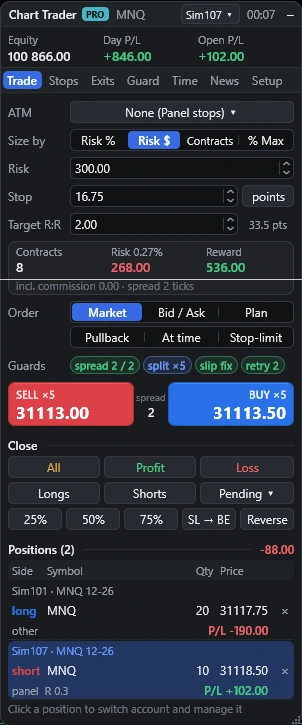
Every account at once
One positions list for all accounts
The Positions section lists open positions across all accounts: side, symbol, quantity, price, P/L and R, plus who manages each one (panel, custom rules, ATM, manual or another tool), five to a page with the total P/L.
- Click a row to switch the panel to that account and instrument. If no chart is open for it, NTP opens or duplicates a chart tab.
- Click × to close that position.
- Click the position's tag on the chart to open the position window: a summary, panel defaults or custom rules for this position only, tabs for Stops, Partials, Hidden and Edit, and buttons for Close 25%, Close 50%, stop to break-even and Flatten.

Per-account risk
Limits that belong to the account
Risk limits follow the account, not the chart. The daily guard (on or off, percent or cash, max loss, target, max entries), the equity floor and ceiling, the day lock and the % DD sizing limit are saved for each account and shared by every NTP panel trading it. Trailing drawdown peaks are saved per account too and survive restarts.
So a breach on one account locks that account only. The breach still acts on the whole of that account: it flattens every position and cancels every working order on it, including orders NTP did not place. Read the risk controls guide for the details.
Other trading settings are saved per root symbol, such as NQ, so they survive contract rollover. One panel owns each account and instrument; a second panel on the same pair pauses rather than managing the same position twice.
Side by side
NinjaTrader alone vs NTP
| Task | Chart Trader + ATM | NT Chart Trader Pro |
|---|---|---|
| Pick the account | Account selector | Header selector, synced with Chart Trader |
| Switch mid-trade | Select another account | Management keeps running on the account you left |
| Risk per account | Set by hand each time | Guard, lock and drawdown peaks saved per account |
| See all positions | Control Center | In the panel, with R and who manages it; click to switch |
| Same order on several accounts | Not covered here | Not supported: NTP is not a copier |
Can I manage several NinjaTrader accounts with NTP?
Yes. Pick the account in the panel's header, switch whenever you like, and see every account's positions in one list. Each account you visit keeps its own settings, trade and background management.
Does an order go to more than one account?
No. NTP is not a trade copier. Each new order goes to the account selected in the panel only.
Can I switch accounts with a position open?
Yes. You can switch with positions and orders open. The account you leave keeps its stop, target, break-even, trailing and partial exits running in the background while the indicator is loaded.
Does the panel follow Chart Trader's account?
Yes. The account selector is synced both ways with the account in NinjaTrader's Chart Trader on the active chart tab.
Are guard limits shared between accounts?
No. The daily guard, equity floor and ceiling, max entries, lock and trailing drawdown peaks are saved per account. A loss on one account does not lock another.
What if two charts use the same account and instrument?
One panel owns each account and instrument. Another panel on the same pair pauses and says to use the active panel, so two panels never manage the same position.
More guides
Try it on your sim accounts first.
48 hours, full panel, no card. One-time plans: $49 for 30 days, $299 for 365 days, $799 lifetime. No automatic renewal.