
Guide · NinjaTrader 8
A NinjaTrader ATM strategy alternative for break-even, trailing and partial exits
In NinjaTrader 8, automatic trade management comes from ATM strategy templates: each one stores a stop, one or more targets and optional auto break-even and auto trail. NT Chart Trader Pro (NTP) manages the same jobs from its panel instead: a 4-stage break-even ladder, 7 trailing stop modes, up to 10 partial exits and optional hidden stops, adjustable per trade. You can also keep your ATM templates and run them through NTP; this page says plainly what changes when you do.
With NinjaTrader alone
What ATM strategies do, and where they get awkward
An ATM strategy is a saved template you pick in Chart Trader or the SuperDOM. When the entry fills, NinjaTrader places the template's stop loss and profit targets, and can move the stop to break-even or trail it using the template's settings. It is built in, it costs nothing extra, and for one fixed bracket it works well.
It gets awkward when your plan changes from trade to trade. Each combination of stop, targets, break-even and trail is another template to build and pick. The quantity is a number you type, so a wider stop does not shrink the size to keep the same risk. Scaling out means setting up extra targets in the template.
Auto break-even
A break-even ladder, not one step
On the Stops tab, set up to 4 stages, each "at X, lock +Y", measured in R, ticks or percent of the target. The default is at 1R lock 0, then at 2R lock 1R. Each stage fires once and only tightens the stop.
- Offset: fixed ticks (default 1) or Spread + comm., the current spread plus your commission in ticks, so "break-even" covers the cost of the trade.
- By hand: the SL → BE button or Shift+E moves the stop to entry plus the offset once price is beyond it.
- Per position: the BE toggle on the chart's position tag turns it on or off for that trade only.
Trailing stop indicator
Seven trailing stop modes for NinjaTrader 8
| Mode | The stop follows |
|---|---|
| Ticks | Price, a set number of ticks back |
| ATR | ATR(14) × a multiple, from price or the prior bar's low or high |
| Candle | The low or high of the last N closed bars, 1 tick beyond |
| MA | An EMA or SMA, period 2 to 400 (default 20) |
| SAR | Parabolic SAR |
| Fractal | The latest confirmed 5-bar fractal |
| Partial | The previous partial level as each partial fills, the first one to break-even |
Ticks, ATR and Candle can use a 4-tier ladder, each tier "from X R, keep this distance", for example 20, then 13, then 10, then 7 ticks as profit grows. Choose when trailing starts (default 1.5R), a minimum step and buffer in ticks, and whether it updates every tick, every 10 seconds or on each new bar. The stop never loosens, and NTP never moves a broker stop through the market.
Scale out
Up to 10 partial exits.
The Exits tab sets partial profit and scale-out levels. Defaults are 2 levels: 50% at 1R and 25% at 2R.
- Side: each level on the profit side (TP) or the loss side (SL) to scale out of a losing trade.
- Where: in R, ticks, price, percent of target or stop, or Auto, spread evenly between entry and target.
- How much: a percentage of the opening quantity, of the remaining quantity, or fixed contracts. Whole contracts only; a level under 1 contract is skipped and says so.
- Move: a reached profit level trails the best price and closes on a pullback (default 0.5R); loss-side levels follow price as profit grows.
Levels can be drawn on the chart with status tags, and 25%, 50% and 75% buttons close part of the position by hand.
Stealth stops
Hidden stops with a broker backstop.
In stealth mode, the stop, target and pending entries stay inside NTP instead of at the broker. When price reaches one, NTP sends a market order, so the fill can differ from the level.
- Broker backstop: a real stop at the broker at a multiple of the hidden stop distance (default 2×, 0 = none). It is the only server-side protection while stops are hidden.
- Trigger price: Ask/Bid, Bid, Mid or bar close.
- Per position: hide one trade's stop and target from the position window.
Hidden levels need NinjaTrader running and connected, and hidden pending orders are not saved across a restart.
Per-position rules
Change one trade without touching the rest
Click a position's tag on the chart to open its window. It starts on the panel's default rules; switch to Custom and that position gets its own break-even, trailing, partial exits and hidden levels, while your other trades keep theirs.
- Tabs: Stops, Partials, Hidden and Edit (exact stop and target prices).
- Apply to: this position only, or also save the rules as the panel default.
- Buttons: Close 25%, Close 50%, SL → BE and Flatten for that position.
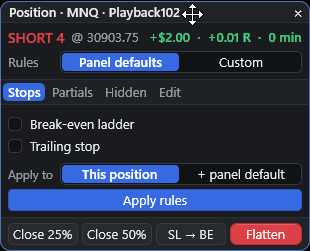
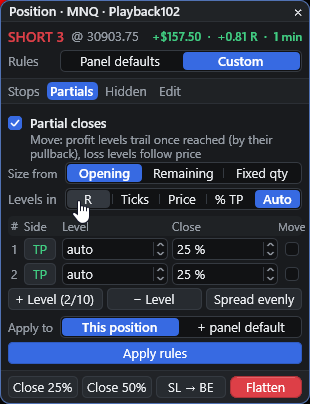
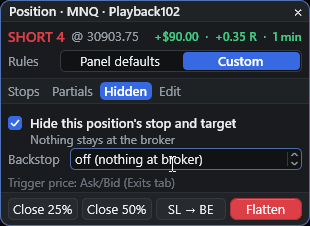
Playback simulation. Interface only, not trading performance. With the backstop off, nothing protects the position at the broker while NinjaTrader is closed; a backstop of 1× to 2× the stop distance is the safer setting.
Presets
Templates without the template editor
Presets save sizing, stops, exits, guard, time and execution settings, and load while you are flat. Three are built in: Scalp (8-tick stop, 1.5 R:R, break-even at 0.8R, tick trailing from 1R), Swing (40-tick stop, 3 R:R, break-even at 1.5R, ATR trailing from 2R, partials) and Prop (0.5% risk with the daily guard on). Any open position can also get its own custom rules from the position window without touching the panel defaults.
Keep your templates
Running NTP with an ATM template
Set the panel's ATM selector to a saved template and NTP uses the ATM engine: each entry starts that template, and the template owns the stop and target. NTP's daily guard, trading hours, schedule and news checks still apply. Two things change, and it is worth being plain about them:
- Sizing must be Contracts, because the template owns the stop.
- NTP's break-even ladder, trailing modes, partial exits, hidden levels and Reverse do not apply to ATM entries. The template's own settings manage the trade.
To use NTP's management, choose None (Panel stops), the default.
Side by side
ATM templates vs NTP's Panel engine
| Task | ATM template | NTP Panel engine |
|---|---|---|
| Quantity | Typed or picked | From Risk %, Risk $, % of trailing drawdown, or fixed |
| Break-even | Auto break-even setting | Ladder of up to 4 stages, offset incl. spread and commission |
| Trailing | Auto trail setting | 7 modes, up to 4 tiers, never loosens |
| Scaling out | Extra targets | Up to 10 levels, profit or loss side, optional trailing |
| Hidden stops | Not covered here | Stealth mode with a broker backstop |
| Change one trade | Edit or switch templates | Custom rules in the position window |
Hidden stops, trailing and partial exits run inside NinjaTrader, which must be running and connected. Stop fills cannot be guaranteed.
What is an alternative to NinjaTrader ATM strategies?
NTP's Panel engine. It places one stop and target pair sized to your position and manages it itself: a break-even ladder of up to 4 stages, 7 trailing stop modes, up to 10 partial exits and optional hidden stops, set on the panel instead of in a template per idea.
Can I use NTP with my ATM templates?
Yes. Switch the panel to the ATM engine and every entry starts your saved template, which owns the stop and target. NTP's daily guard, schedule and news checks still apply, but sizing must be Contracts and NTP's break-even, trailing, partial exits, hidden levels and Reverse do not apply.
How does auto break-even work in NTP?
Set up to 4 stages such as at 1R lock 0, at 2R lock 1R, in R, ticks or percent of target. Each stage fires once and only tightens the stop. The offset can be fixed ticks or the current spread plus commission. The SL to BE button or Shift+E moves the stop to break-even by hand.
Which trailing stop modes are there?
Ticks, ATR, Candle, moving average (EMA or SMA), Parabolic SAR, Fractal and Partial. Ticks, ATR and Candle can tighten in up to 4 tiers as profit grows. A trailing stop never loosens.
How do partial exits and scaling out work?
Up to 10 levels on the profit or loss side, in R, ticks, price, percent of target or stop, or spread evenly. Each closes a percentage of the opening or remaining size or a fixed number of contracts, in whole contracts. A reached profit level can trail and close on a pullback.
Are hidden stops safe if NinjaTrader disconnects?
Hidden stops live inside NTP, so NinjaTrader must be running and connected. Set a broker backstop: a real stop at the broker at a multiple of the hidden stop distance. It is the only server-side protection while stops are hidden.
More guides
Manage your next trade from the panel.
48 hours, full panel, no card. One-time plans: $49 for 30 days, $299 for 365 days, $799 lifetime. No automatic renewal.