
Guide · NinjaTrader 8
A NinjaTrader Chart Trader alternative that sizes the trade for you
NinjaTrader 8's built-in Chart Trader places orders from a chart: buy and sell buttons, a quantity box and an ATM strategy selector. If you also want the quantity worked out from your risk, a visual trade planner and break-even, trailing and partial exits in the same place, you need a custom chart trader indicator. This page shows what the built-in tools do, where they stop, and what NT Chart Trader Pro (NTP) adds.
With NinjaTrader alone
What the built-in Chart Trader does
Chart Trader comes with NinjaTrader 8 and costs nothing extra. Turn it on from the chart's toolbar or the chart properties and it docks a panel to the side of the chart. From there you:
- pick the account, the quantity and an ATM strategy template;
- buy or sell at market, or join the bid or ask, with one button;
- right-click a price on the chart to place a limit or stop order there;
- drag working orders on the chart to change their price;
- reverse or close the position.
The stop loss and profit target come from the ATM strategy you selected. An ATM template stores the bracket distances and can include auto break-even and auto trail settings. The SuperDOM gives you the same order entry on a price ladder. If you trade one fixed size with one fixed bracket, this is a complete workflow and you may not need anything else.
Where it stops
Where the built-in tools stop
The gaps show up when your size or your plan changes from trade to trade:
- Quantity is a number you choose. Chart Trader does not work out how many contracts fit your dollar or percentage risk for a given stop. You do that sum yourself before every trade.
- The bracket is fixed by the template. A wider stop on one setup means switching or editing ATM templates, and the quantity does not adjust to keep the same risk.
- You cannot see the trade before you place it. There is no planner that shows entry, stop and target with the money at risk and the R:R before you click.
- Management lives in templates. Changing the rules for one open position, or running different rules on different accounts, means more templates.
What NTP adds
One panel that sizes, places and manages.
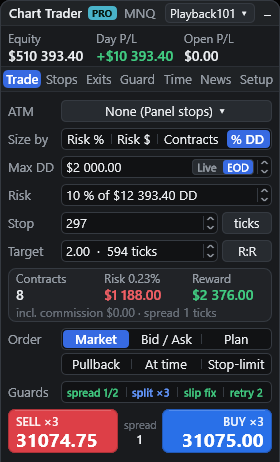
NTP is a NinjaTrader 8 chart indicator. Add it to a chart and you get a floating panel for that chart's instrument with seven tabs: Trade, Stops, Exits, Guard, Time, News and Setup.
- Size by Risk %, Risk $, fixed Contracts or a percentage of your remaining trailing drawdown. Contracts are rounded down, so the risk never exceeds your setting.
- The pre-trade card shows contracts, risk, reward and the commission included, before you click Buy or Sell.
- Stops in ticks, points, bars or a multiple of ATR(14); targets as R:R, ticks or points.
Plan on the chart
See the trade before you send it.
Choose Plan and NTP draws entry, stop and target lines with shaded risk and reward zones. Drag the stop and the size recalculates; drag the target and the R:R updates. The entry tag shows the order type and contracts, the stop tag the dollar risk and percentage, the target tag the reward in dollars and R.
After the fill
Management without a template per idea
With NTP's default Panel engine, NTP places one OCO stop and target pair sized to your position and manages it itself:
- Break-even ladder: up to 4 stages, such as "at 1R lock 0, at 2R lock 1R", in R, ticks or percent of target.
- Trailing stop, 7 modes: ticks, ATR, candle, moving average (EMA or SMA), Parabolic SAR, fractal, or step to the previous partial level. A trailing stop only tightens.
- Partial exits: up to 10 levels on the profit or loss side, in R, ticks, price, percent of target or spread evenly. Levels can trail once reached.
- Per-position rules: click a position's tag on the chart to give that one trade custom stops, partials or hidden levels, or close 25% or 50%, move the stop to break-even or flatten.
- Slippage fix: after a fill, stop and target shift so their distances are kept from the actual fill price.
Prefer your ATM templates? Switch the panel to the ATM engine and every entry starts your saved template. NTP's quantity, daily guard, schedule and news checks still apply; the template owns the stop and target.
Panel views
Take only the room you need.
NinjaTrader's Chart Trader docks on the right of the chart. NTP's panel floats on the chart itself: drag it by its header anywhere, and it snaps to edges and corners. Left-handed traders, or anyone who watches the left of the chart, can keep it on the left. Resize it from 240 to 560 pixels wide. The collapse button cycles between the full panel, compact Buy and Sell controls, and the header alone.
- Themes: Auto (follows the chart), Dark or Light
- Text size from 80% to 160%
- Equity, Day P/L and Open P/L in the account row
Side by side
NinjaTrader built-in vs NTP
| Task | Chart Trader + ATM | NT Chart Trader Pro |
|---|---|---|
| Panel position | Docked on the right of the chart | Floats on the chart: left, right or any corner, snapping to edges |
| Order quantity | Typed or picked | Calculated from Risk %, Risk $ or % of trailing drawdown, or fixed contracts |
| Plan before placing | Right-click a price for a limit or stop | Draggable entry, stop and target lines with live risk, reward and R |
| Stop and target | From the ATM template | Ticks, points, bars or ATR; R:R, ticks or points; or your ATM template |
| Break-even | ATM auto break-even | Ladder of up to 4 stages |
| Trailing | ATM auto trail | 7 modes, each only tightens |
| Scaling out | Extra ATM targets | Up to 10 levels, profit or loss side, optional trailing levels |
| Panel layout | Docked beside the chart | Floating, 240–560 px, compact and header-only views |
Break-even ladders, NTP trailing, partial exits and hidden levels need NTP's Panel engine, not ATM.
Is it for you?
When to stay with Chart Trader
Stay with the built-in tools if you trade a fixed size with one bracket and are happy with your ATM templates. Look at NTP if you size by risk, move your stop to suit each setup, scale out in stages, or watch several accounts and want each one to keep its own management when you switch. NTP lets you switch accounts with positions and orders open, and its positions list shows every account; it is not a trade copier.
Hidden stops, trailing, partials and schedules run inside NinjaTrader, so it must stay running and connected with the chart open. Test any setup on a simulation account first.
Does NTP replace NinjaTrader's Chart Trader?
It runs beside it. NTP's account selector stays in sync with Chart Trader's account on the active chart tab, and with Manage set to Any position, NTP can also manage positions you opened from Chart Trader, the DOM or a phone, unless they already have their own stop and target orders.
Can I keep using my ATM strategy templates?
Yes. Switch the panel to the ATM engine and entries start your saved template, which then owns the stop and target. Sizing must be Contracts, and NTP's break-even ladder, trailing, partial exits, hidden levels and Reverse are not used with ATM.
Is NTP a trade copier?
No. You can switch accounts with positions open and see positions across all accounts, but new orders go to the selected account only.
What happens if NinjaTrader closes?
Normal stop and target orders sit at your broker. Hidden stops, trailing, partials, schedules and alerts run inside NinjaTrader, so they stop until it is running and connected again. In stealth mode the optional broker backstop is the only server-side protection.
What does it cost?
One-time payments with no automatic renewal: $49 for 30 days, $299 for 365 days or $799 lifetime. There is a free 48-hour trial with no card.
What do I need to run it?
NinjaTrader 8 on Windows with a data and broker connection. NTP is a chart indicator, one panel per chart, for that chart's instrument.
More guides
Try NTP on your chart.
48 hours, full panel, no card. Start in simulation and decide with your own settings.