
Guide · NinjaTrader 8
NinjaTrader position size calculator: contracts from your risk and stop
Position size for futures is the money you are willing to lose divided by what one contract loses at your stop, rounded down. NinjaTrader 8 does not do this sum for you: Chart Trader and ATM templates use the quantity you type. Below is the formula, a free calculator, and how NT Chart Trader Pro (NTP) sizes every order on the chart, including from a prop account's trailing drawdown.
The formula
How to size a futures position by risk
- Pick your risk money for this trade: a fixed amount, or a percentage of your account.
- Measure the stop distance in ticks from entry to stop.
- Loss per contract = stop ticks × tick value + round-turn commission.
- Contracts = risk money ÷ loss per contract, rounded down to a whole number.
Example: you risk $500 on NQ with a 20-point stop. NQ moves in 0.25-point ticks worth $5, so 20 points is 80 ticks and $400 per contract. $500 ÷ $400 = 1.25, so you trade 1 contract and risk $400. On MNQ, at $0.50 a tick, the same stop costs $40 per contract: 12 contracts, $480. Add commission of $1.50 per side and each contract costs $43, so the answer drops to 11.
Rounding down matters: rounding up would put more than your limit at risk.
Free calculator
Pick your risk. See the contracts.
Choose the instrument, then move the sliders for risk per trade, stop distance in points and target R:R. The result is the whole number of contracts that fits your risk, with the actual risk and reward.
Simplified illustration: whole contracts rounded down, no commission or spread. The real panel also applies configured commission and your minimum and maximum quantity limits. Not a trade recommendation.
With NinjaTrader alone
Sizing with NinjaTrader 8's built-in tools
NinjaTrader shows each instrument's tick size and point value in its Instruments window, so you can do the sum above by hand or in a spreadsheet. Then you type the result into Chart Trader's quantity box or your ATM template. That works, but you repeat it on every trade, and a stop you widen after the fact leaves the size unchanged.
Position sizing indicator
NTP sizes every order before you click.
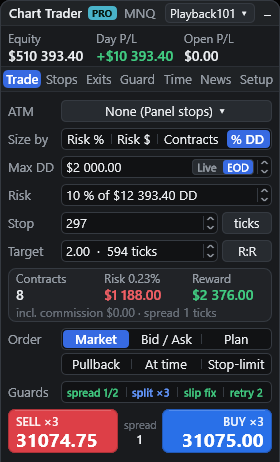
The Trade tab's "Size by" setting has four modes. The pre-trade card shows contracts, risk with its percentage of the base, reward, the commission included and the spread in ticks, plus the largest size you can afford.
- Risk % of an account base, 0.01 to 100% (default 1%).
- Risk $: a fixed cash amount (default $200).
- Contracts: a fixed quantity.
- % DD: a percentage of your remaining trailing drawdown.
Details
What NTP checks before it sends
For Risk %, choose the account base: Balance (cash), Equity (net liquidation), Free margin, Day start (cash minus today's realized P/L) or a Custom amount. Stops can be set in ticks, points, bars or a multiple of ATR(14); bar and ATR stops show the computed tick distance, and the size follows. In the on-chart planner, dragging the stop re-sizes the trade as you move it.
- Fewer than 1 contract is rejected, with what 1 contract would risk.
- A stop tighter than twice the spread is rejected.
- Your maximum quantity caps the size; your minimum rejects a smaller one.
- A margin check compares the size with your excess margin, for example "Not enough margin: max N".
One honest limit: risk dollars include commission but not the spread, and stop fills can slip, so the real loss can differ from the plan.
Prop firm position sizing
Size from the drawdown you have left.
On a trailing-drawdown account, the number that matters is how far you are from the limit. % DD sizing risks a share of that. NTP finds the drawdown in this order:
- Tradovate: on Tradovate connections, the live auto-liquidation drawdown, read with NinjaTrader's own session.
- NinjaTrader: the account's TrailingMaxDrawdown value, when the broker reports it.
- Manual: a Max DD you enter, trailing Live (peak equity including open P/L) or EOD (peak start-of-day balance). Peaks are saved per account.
The risk field then reads, for example, "10 % of $1,992 DD". These are your own limits inside NinjaTrader; they do not replace your firm's rules.
Side by side
NinjaTrader built-in vs NTP
| Task | Chart Trader + ATM | NT Chart Trader Pro |
|---|---|---|
| Contracts from risk | Worked out by hand | Risk %, Risk $ or % of trailing drawdown |
| Account base | Your own sums | Balance, Equity, Free margin, Day start or Custom |
| Commission | Your own sums | Round-turn commission added per contract |
| Trailing drawdown | Tracked yourself | Tradovate, NinjaTrader or manual Live/EOD |
| Wider stop | Size stays the same | Size recalculates |
| Pre-trade checks | Your order quantity | Under 1 contract, tight stop, min/max and margin |
With the ATM engine, sizing must be Contracts because the template owns the stop.
How do I calculate position size for futures?
Divide the money you are willing to lose by the loss per contract at your stop, then round down. Loss per contract is the stop distance in ticks times the tick value, plus round-turn commission.
Does NTP include commission and spread in the risk?
Commission yes: the Commission per contract setting is doubled for the round turn and added to the loss per contract. Spread no: it is used to reject stops tighter than twice the spread, for bar and indicator stops on shorts, for the automatic break-even offset and for the maximum-spread entry filter.
What if the result is less than one contract?
NTP trades whole contracts only. If your risk does not cover one contract, the entry is rejected and the panel shows what one contract would risk, so you can widen the risk or tighten the stop.
How does trailing drawdown sizing work for prop accounts?
Choose % DD and NTP risks a percentage of the drawdown you have left. It reads the drawdown from Tradovate on Tradovate connections, from NinjaTrader's TrailingMaxDrawdown account value when the broker reports it, or from a Max DD you enter, trailing live or end of day.
Can I use risk sizing with ATM templates?
No. With the ATM engine the template owns the stop, so sizing must be Contracts. Risk %, Risk $ and % DD sizing work with NTP's Panel engine.
Is the calculator on this page the same as NTP?
It uses the same rounding down but leaves out commission, spread and quantity limits to stay simple. The panel applies those, plus a margin check, before it sends an order.
More guides
Size your next trade on the chart.
48 hours, full panel, no card. One-time plans: $49 for 30 days, $299 for 365 days, $799 lifetime.